One Switch App For Mac v1.34.2 Powerful Switches In One Place App Free Download
One Switch App for Mac helps optimize your workflow from One Place. Free Download. Hi friends! Today, I’d like to share a straightforward app for your Mac that enables you to manage tasks from a single, central location: One Switch for Mac. One Switch is a compact menubar app that offers quick access to numerous useful features, consolidating all your critical controls in one place. This app can save time for Mac users by providing easy access to key features, such as toggling between dark and light modes and managing AirPods connections. You may also want to consider Alfred 4 Powerpack for Mac.
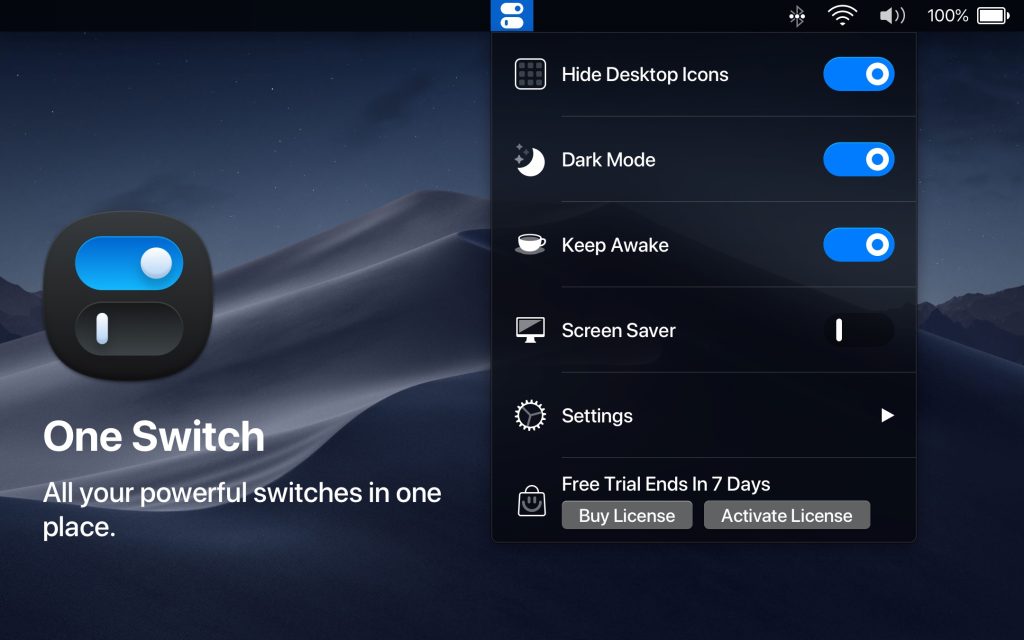
You can customize the app to display specific toggles in your menu bar while hiding those you don’t use regularly for added convenience. It’s tailored to fit your workflow. One Switch App is unobtrusive while residing in your menu bar, yet it significantly enhances your user interface. Designed for macOS 10.14 and later, One Switch looks great in both light and dark themes. You can easily switch between the two modes or set the app to change automatically from sunrise to sunset.
With One Switch, you can instantly hide and show desktop icons—ideal for when you want a clean desktop or need to grab a screenshot. The app features a toggle that clears all desktop clutter with a single click. Pairing Bluetooth earbuds with your Mac typically requires a minimum of five steps, but with One Switch, it’s as simple as one step. Instead of digging through Preferences, click on AirPods in the menu bar, and One Switch will instantly connect your device.
Don’t waste your Mac’s battery life! One Switch allows you to put your computer to sleep or to set automatic sleep and wake times. It also includes a manual switch for when you need it. Manage your work hours distraction-free by switching to “Do Not Disturb” mode or by scheduling your do-not-disturb hours directly from the menu. One Switch App will automatically turn off notifications, keeping your screen clear.
One Switch can display up to seven toggles at a time, with more functionalities coming soon. If you don’t want all of them visible in the menu bar, you can easily disable the unnecessary ones in Preferences, accessible via the Customize button in the app’s menu. If you’re interested, follow the link below to download One Switch.
The Features of One Switch App for Mac OS Full Version Free Download:
- Hide Desktop Icons: Instantly hide or show all icons on your desktop to clear clutter or prepare screenshots.
- Dark Mode Toggle: Switch between light and dark appearance modes or set automatic switching at sunrise/sunset.
- Keep Awake: Prevent your Mac from sleeping or showing the screen saver with one click.
- Screen Saver Launch: Manually trigger your screen saver instantly, without needing to go through System Preferences.
- AirPods Connect: Quickly connect your AirPods (or other Bluetooth earbuds) with just a single click in the menu bar.
- Do Not Disturb Toggle: Enable or schedule “Do Not Disturb” to silence notifications and stay focused.
- Night Shift Toggle: Turn on/off Night Shift (warmer screen tone) without digging into display settings.
- True Tone Switch: Enable or disable True Tone display adjustment directly from the menu bar.
- Screen Resolution Quick-Change: Adjust your display’s resolution on the fly for work, external monitors, or presentations.
- Show/Hide Hidden Files: Toggle visibility of hidden Finder files without using Terminal.
- Screen Clean Mode: Display a blank or colour screen to help clean your display or inspect for smudges/dead pixels.
- Keyboard Lock: Lock your keyboard quickly to prevent accidental keystrokes (proper when cleaning or leaving your Mac).
- Eject External Drives: Unmount connected external disks with a single switch rather than navigating Finder.
- Customise Menu-Bar Toggles: Choose which switches appear in your menu bar so you only see the ones you use.
Technical Setup Detail of One Switch App Mac Full Version Free Download:
| Name | One Switch |
|---|---|
| File Name | OneSwitch.zip |
| File Size | 10 MB |
| Version | 1.34.2 |
| License Type | Shareware (one-time purchase) |
| Released Date | June 29, 2023 |
| Created By | Fireball Studio |
| Publisher | Fireball Studio |
| Developer | Fireball Studio |
| Category | Utilities / Productivity |
| Language | English |
| Uploaded By | — (not publicly specified) |
| Official Website | https://fireball.studio/oneswitch |
| Compressed Type | .zip |
| Compatibility | macOS 10.15 (Mojave) or later (Intel) |
System Requirements of One Switch Mac App Free Download Full Version:
| Specification | Requirement |
|---|---|
| Operating System | macOS Big Sur (11) or later (official). Some distributors list macOS 12+ for certain builds. |
| Processor / Architecture | Intel (64-bit) or Apple Silicon (ARM) — universal builds available / supported. |
| RAM | Not specified by developer. |
| Graphics Card | Not specified / uses standard macOS graphics stack. |
| DirectX | N/A (macOS does not use DirectX) |
| Storage | Not specified by developer (small utility — typically tens of MBs). |
| Input device | Keyboard and mouse / trackpad (standard macOS input devices) |
| Permissions | May request Accessibility or Screen Recording permissions for some switches (granted via System Settings). |
| Display resolution | Not specified (standard macOS resolutions supported). |
| Internet connection | Not required for core functionality; needed for license activation, updates, or Setapp access. |
| Mouse | Supported (standard macOS mouse input) |
| Keyboard | Not specified by the developer. |
How to Download and Install One Switch App For Mac on Mac OS X?
- First, click the download button below and shift to the download page.
- You can easily download the One Switch for Mac app file on the download page.
- Now, extract the zip file. And Double-click on the file.
- Now, drag and drop the app icon into the Application folder.